Features
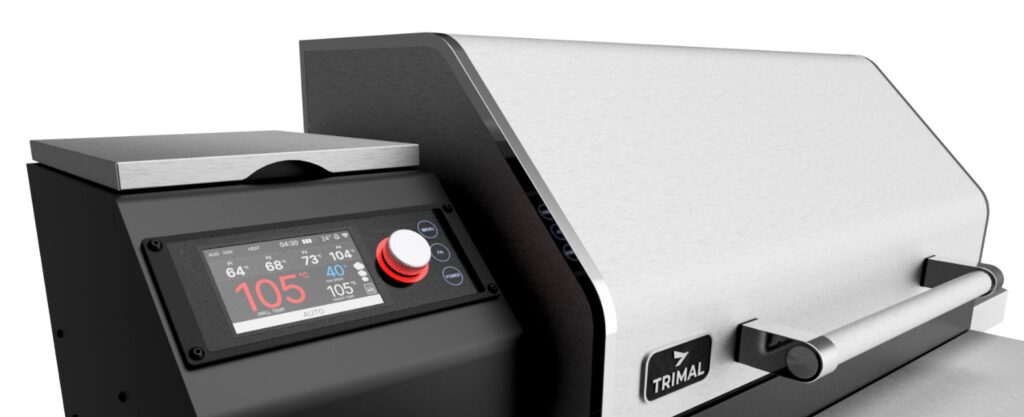
- 4.3” full-colour ultra-bright screen, easy to read even in direct sunlight
- Intuitive dial and button navigation — simple to scroll and select
- Automatically controls all target temperature and smoke levels
- Real-time display of grill temperature, food probe readings, and operating mode
- Error codes and maintenance alerts shown clearly on the screen
- Supports multiple cooking modes (AUTO, Pellet Only, Pizza, Rotisserie, etc.)
- Designed for both beginners and experienced pitmasters
- Hopper wood pellet level measurement and usage tracking
- WIFI and Bluetooth connectivity to work with the Trimal Aus mobile App
Colour Screen
- Super bright (900 cd/m²) 4.3” 480×800 IPS TFT colour display
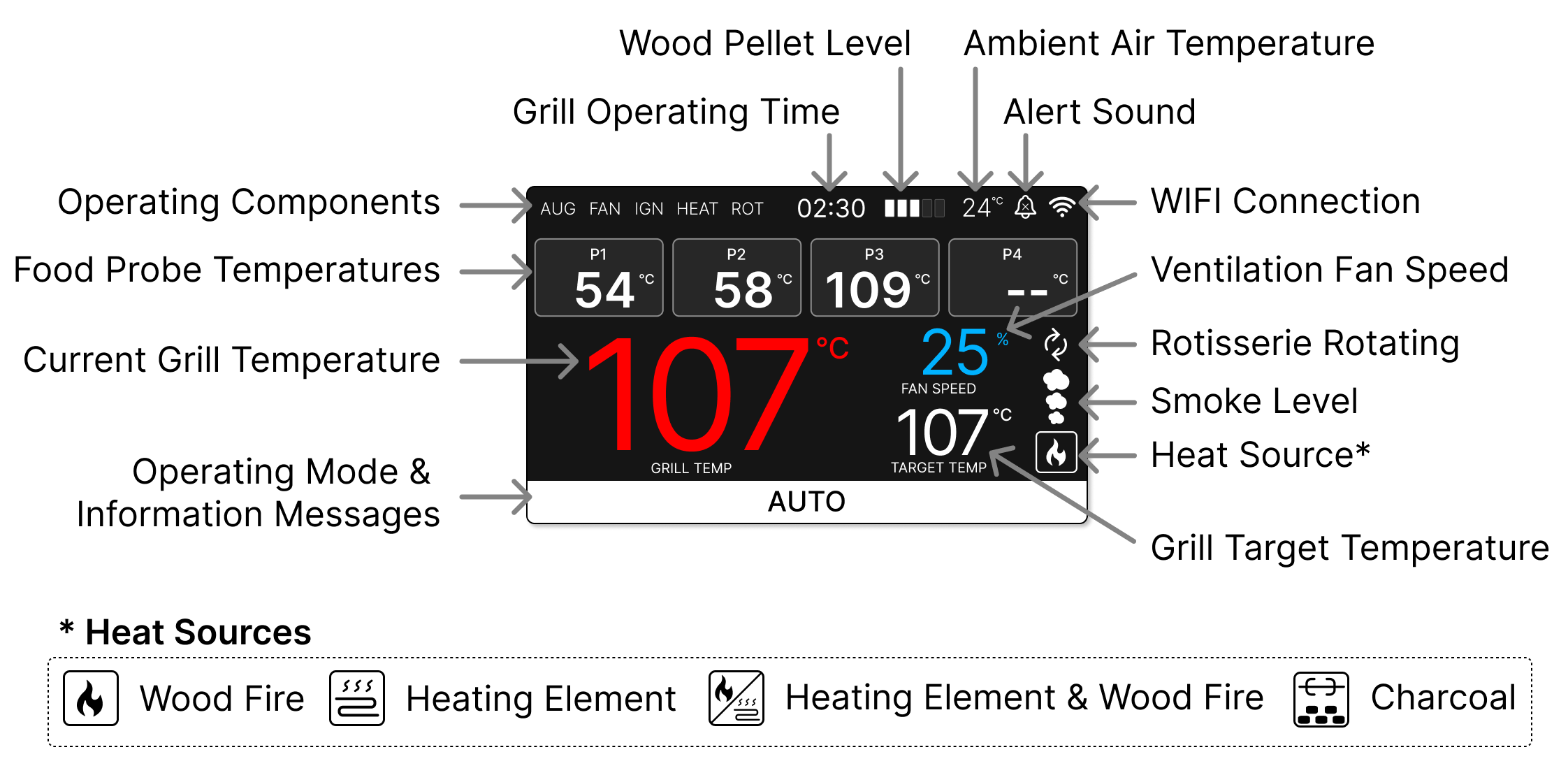
- The screen provides all key information related to the grill operation and temperatures.
Screen Hot Weather Sleep
- To prevent overheating of the screen, in hot weather it will go to sleep after several minutes of no user input.
- Press the control knob to wake the screen back up.
Control Buttons
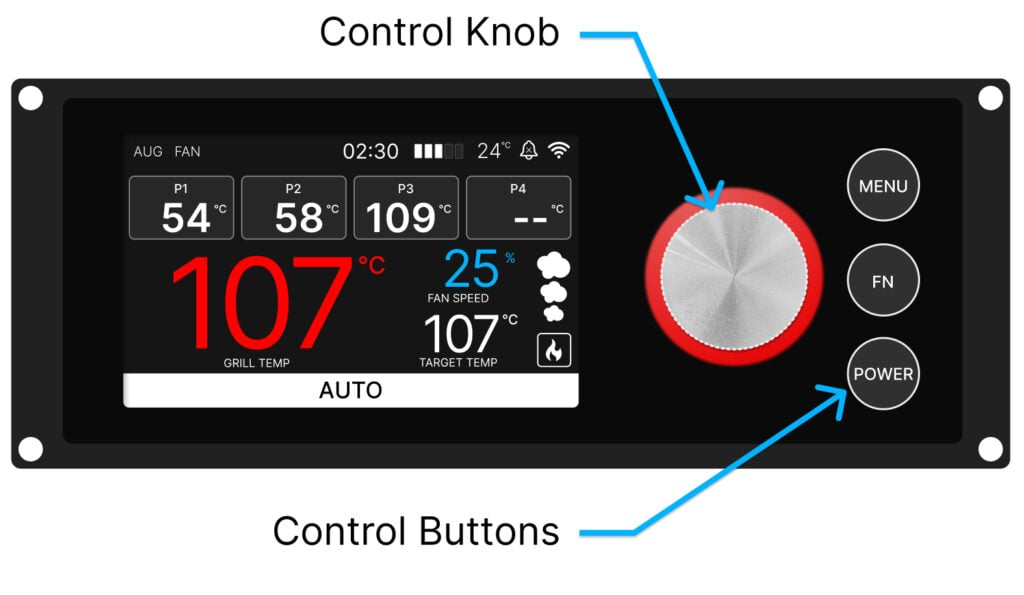
- Most operations on the grill can be completed on the controller using the 3 touch buttons and large silver control knob.
- Advanced features such as recording cooks, setting trigger-actions and notifications require the Trimal Aus App.
Control Knob
- Single press to confirm a setting or selection.
- Rotate to navigate through the menu options or change setting values.
MENU button
- Touch once to enter the menu to access to all the operating functions and settings.
FN (Function) button
- In Rotisserie cooking modes, single press to start/stop rotisserie shaft rotation.
POWER button
- Turn the controller on by pressing and holding for 2 seconds
- Turn off or shut down the grill by pressing and holding for 2 seconds – a confirmation menu will be displayed.
- Use the physical on/off switch on the back of the hopper to permanently turn power off.
- Touch once to wake the screen after it has gone to sleep (while grill is operating in hot weather).
Controls Menu
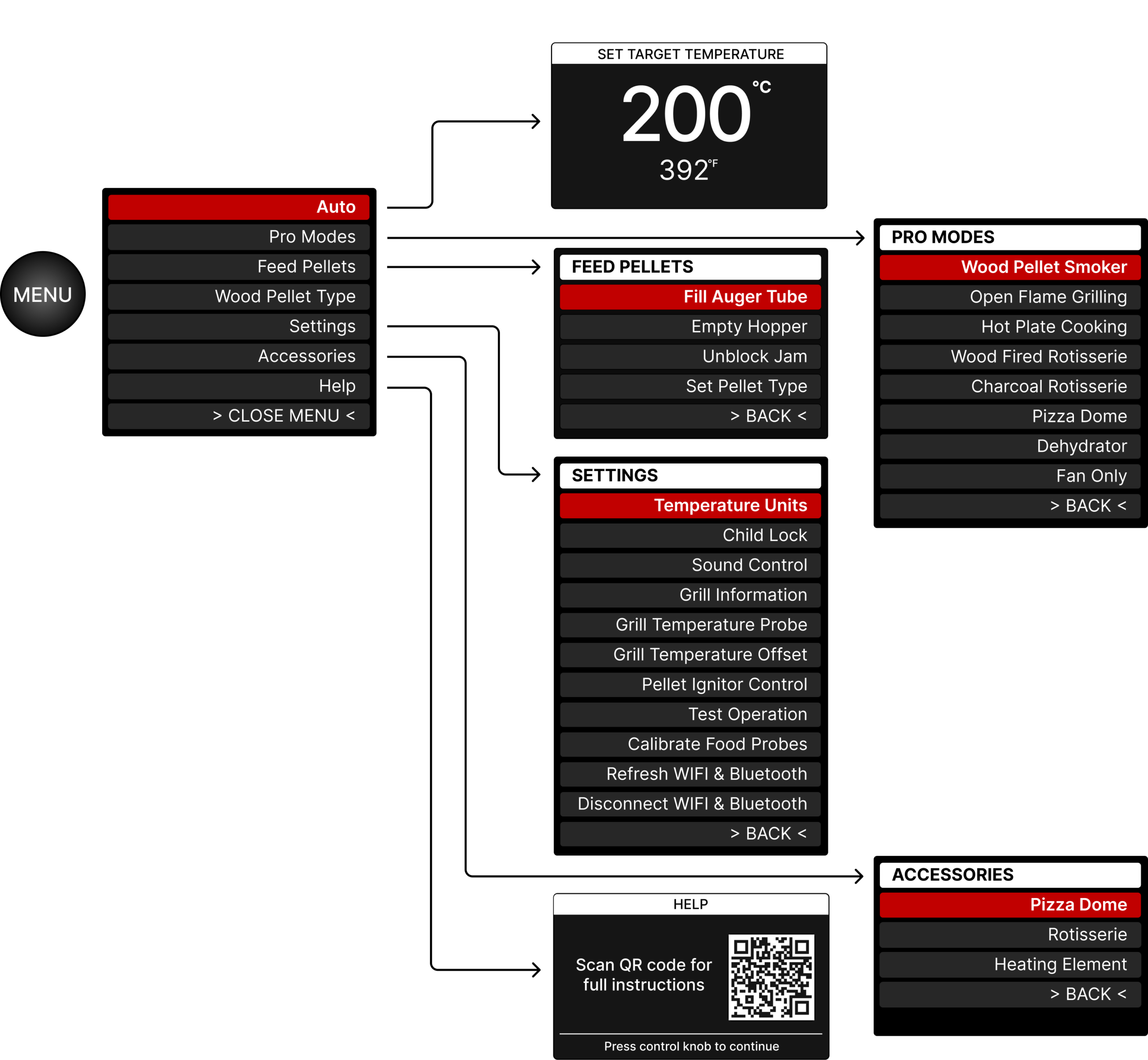
- Below is a summary of the top two levels of the controller menu.
- To access, press the MENU button, rotate the control knob and press to select.
- Menu items may change with screen software updates over time.
Cooking Modes
Click here for dedicated instructions on the Auto and Pro cooking modes.
Feed Pellets
Feeding pellets is only available in the standby screen, not when the grill is operating. When pellets are feeding, press the control knob at all time to stop.
Fill Auger Tube: Runs the auger motor for 25 seconds to fill the auger tube up with pellets. Only required if the hopper and feed tube are totally empty.
Empty Hopper: Runs the auger motor for 120 seconds to clear out any remaining wood pellets in the bottom of the hopper once the majority have been dumped out.
Unblock Jam: Runs the auger forwards and backwards several times to help clear an auger that is jammed with a wood pellet. If this does not work the first time, do not keep trying as it could damage the auger motor. Instead, remove the auger shaft and do a thorough clean.
Settings
Temperature Units: Set Celcius or Fahrenheit
Child Lock: Lock the controller so kids playing with the buttons won’t change settings.
Sound Control: Select which alerts will sound on the controller
- Fire Lit (3 short beeps once the fire is confirmed as lit, normally after 2 to 3 minutes)
- Ready to Cook (3 short beeps when approaching target temperature)
- Grill Error (3 long beeps if any grill errors occur)
Grill Information: WIFI and Bluetooth connection status, grill software version and serial number.
Grill Temperature Probe: Select between grill (default) or probe 1/2 in the case that grill sensor is providing bad reading.
Grill Temperature Offset: Adjust the grill temperature reading to more closely match the middle of the grill rack based on reference temperature measurement.
Pellet Ignitor Control: Disable the pellet ignitor if it has failed and the grill is to be manually fired up until a replacement is done.
Test Operation: Test the operation of the auger, fans, pellet ignitor and rotisserie motor.
Calibrate Food Probes: Adjust the temperature readings of the food probes to match reference temperature reading or zero degree Celsius in ice cold water.
Refresh WIFI & Bluetooth: Use if the connection is frozen or failing to connect.
Disconnect WIFI & Bluetooth: Force the controller to disconnect (forget) the current WIFI network. Useful if having connection issues, or changing to a new network.
Accessories
Set if the Heating Element, Pizza Oven and Rotisserie are installed (or available to use).
Wiring Diagram
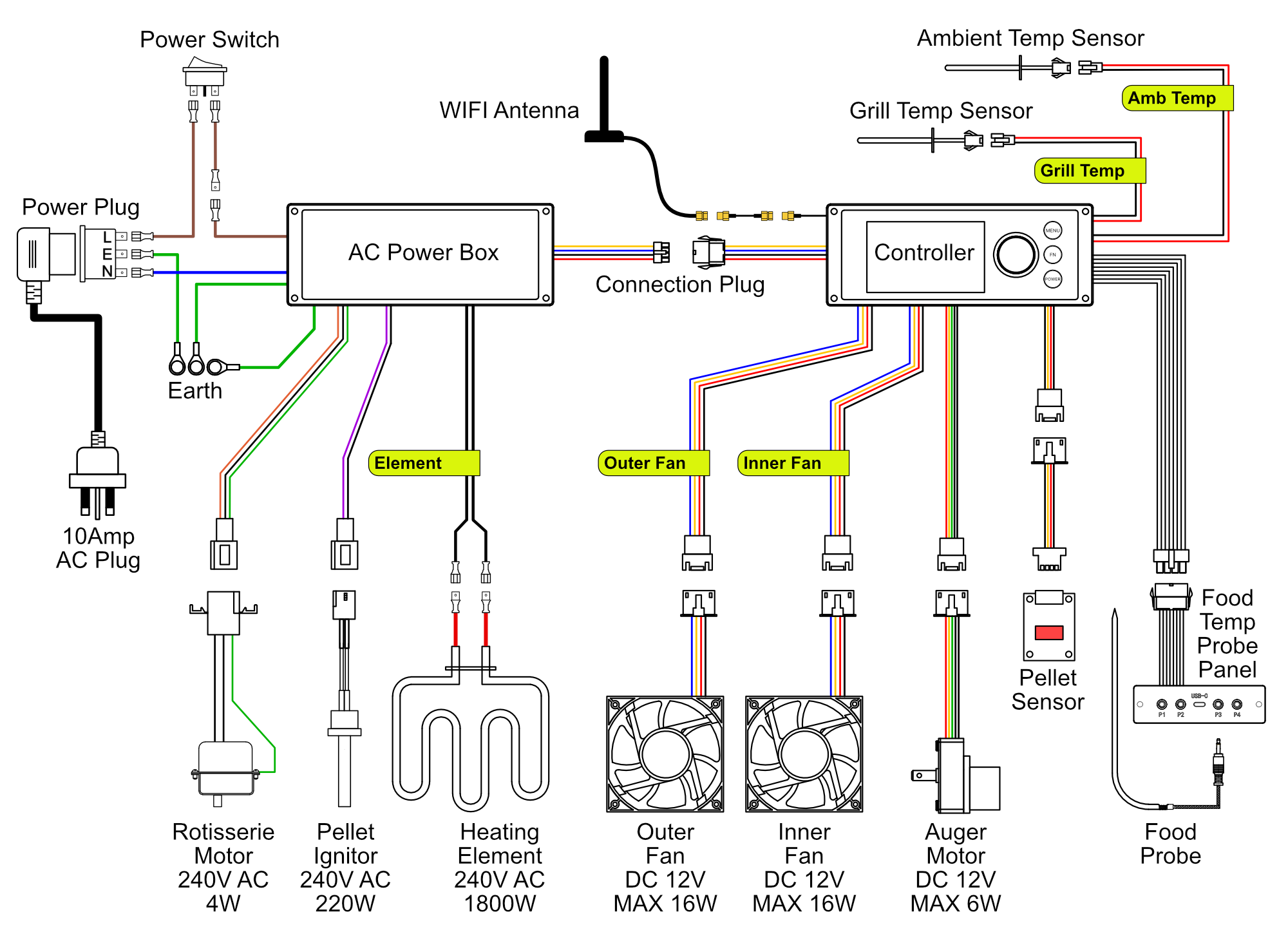
- AC power devices are connected to the AC Power Box.
- DC powered devices and all sensor are plugged into the Controller.
- The AC Power Box and Controller are linked via a connection cable
Wood Pellet Level Measurement
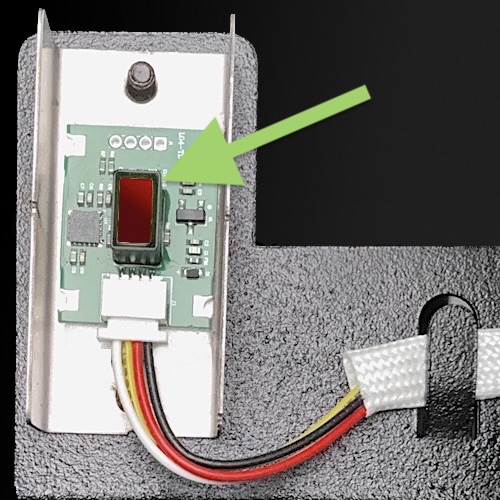
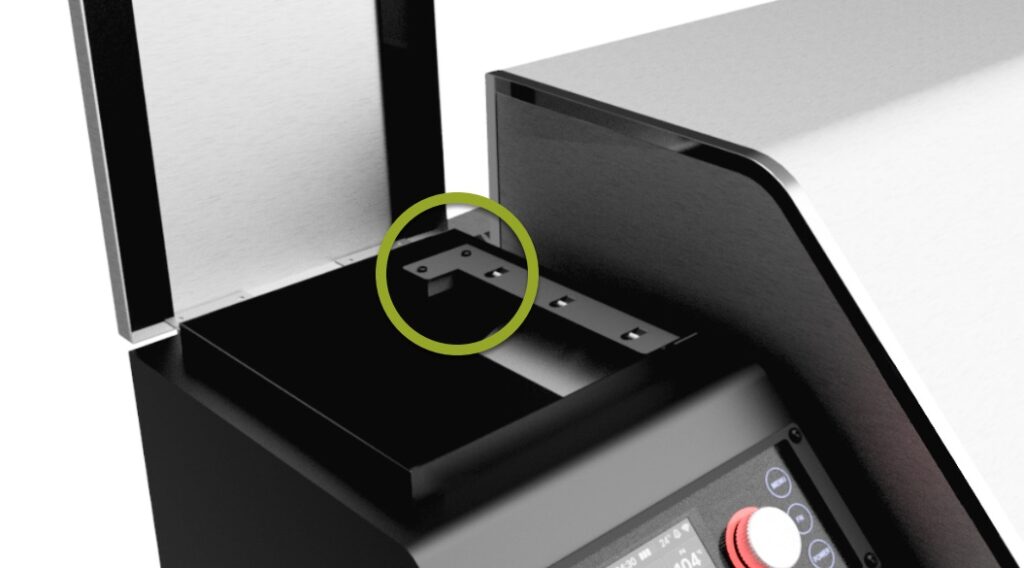
- Trimal S1 grills come standard fitted with a laser height measurement sensor located in the back right corner of the hopper.
- A height measurement is taken each time wood pellets are added into the hopper.
- For most accurate measurements, smooth out the wood pellets level with your hand once poured into the hopper.
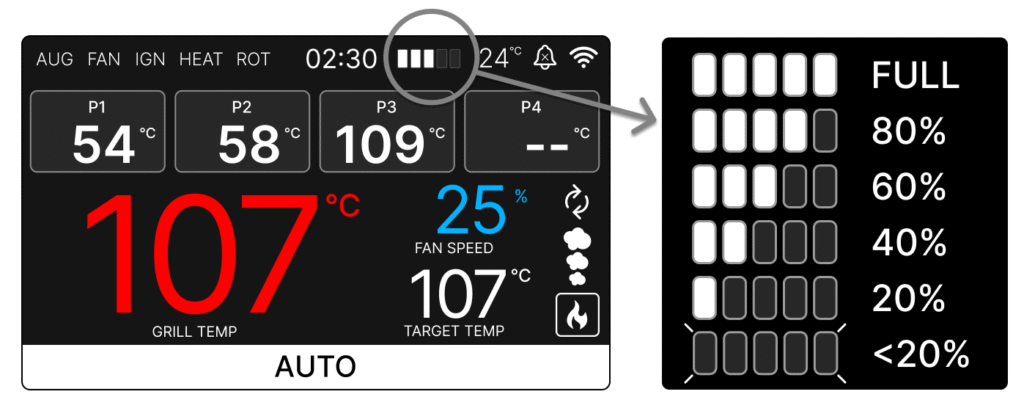
- As pellets are used the level of pellets does not drop evenly, so any height measurement would be very inaccurate. Instead, as pellets are consumed the auger operating time is used to estimate the remaining pellets in the hopper as well as total kilograms burnt in the current cook.
- The estimated level of pellets remaining is shown via 5 bars on the controller screen.
- Once below 20% the level indicator will flash and the Trimal Aus mobile App will send a low pellet warning.
- If the pellet measurement is constantly showing as full, a thick layer of wood dust may have accumulated on the laser glass cover.
- Use a mirror (or phone selfie camera) to view from underneath to clearly see the pellet sensor.
- Gently wipe the glass cover (shown in red in the image below) clean with a soft dry cloth.