
The Mini grill’s bright colour display provides a clear overview of the grill operation and and access to most functions through an intuitive menu.
The grill operation can be managed using the large rotating control knob and the Trimal Aus mobile app.
Control Knob Panel
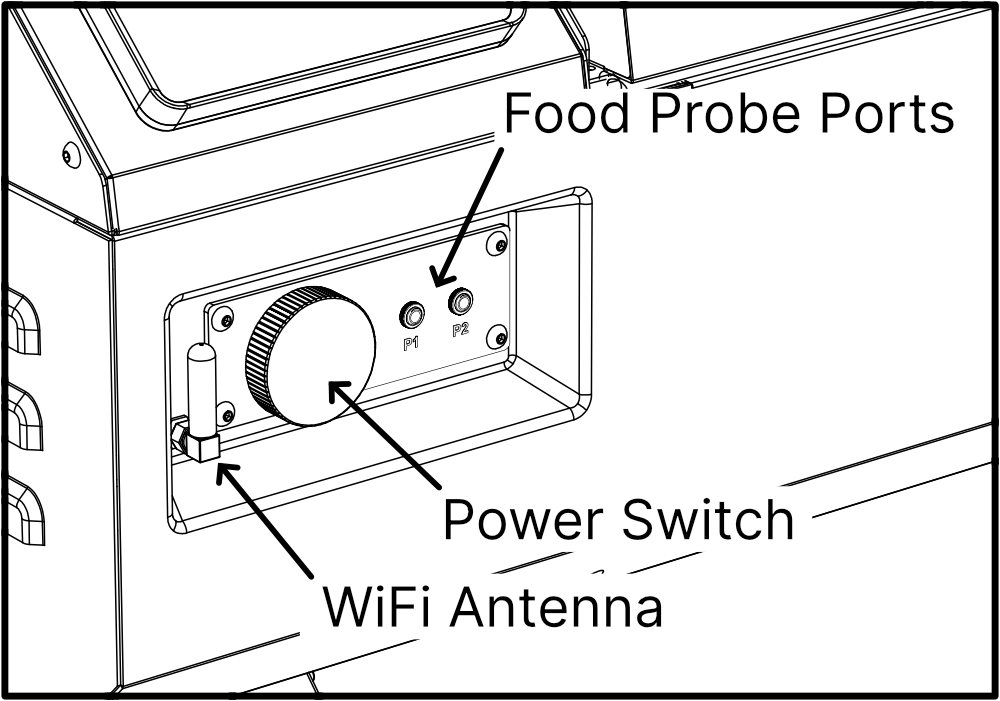
- The front control knob panel includes the WiFi antenna, control knob and two food temperature probe ports.
- Use the control knob to manage the operation of the grill.
- Plug food probes into the ports to monitor the temperature of food whilst cooking. The temperatures can be viewed in the Trimal Aus app as well.
Control Input
Wake Grill Up From Sleep
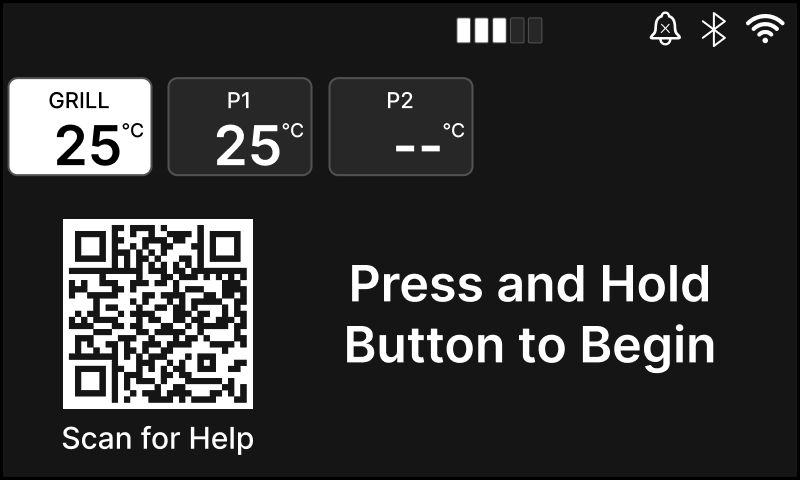
- With the power button on the back pressed in (power on), press the control knob once to wakeup the grill.
- The controller version number will be shown then the standby screen will be displayed.
- Use the physical on/off button on the back of the grill to permanently the turn power off.
- The controller will go to sleep after a few minutes of no input or grill operation.
Enter Menu
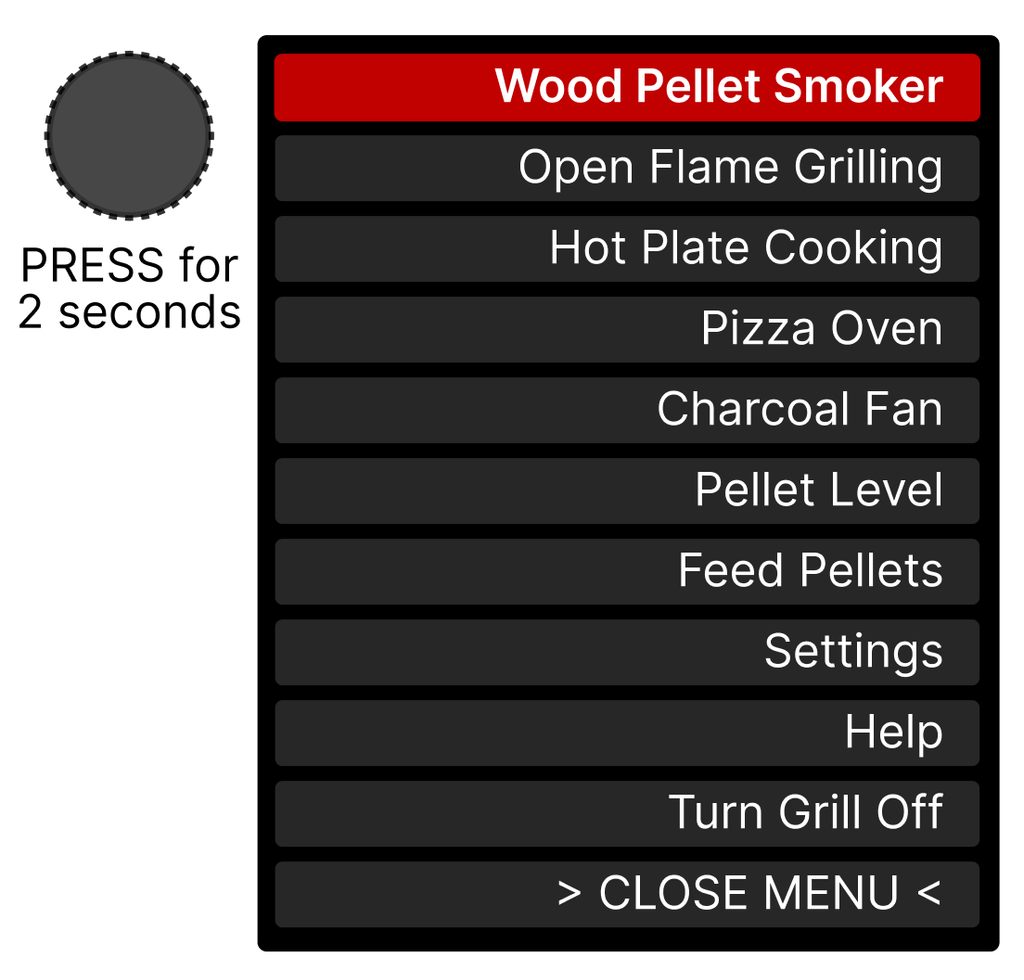
- Press and hold the control knob for 2 seconds to enter the menu.
Navigate and Select
- Rotate the knob to scroll though the menu options or change setting values.
- Single press the knob to select or confirm selection.
- Scroll to the end of the menu and select BACK (up one menu level) or CLOSE MENU (exit menu).
Screen Elements
The screen displays all the relevant information to the cook with a bright colour display.
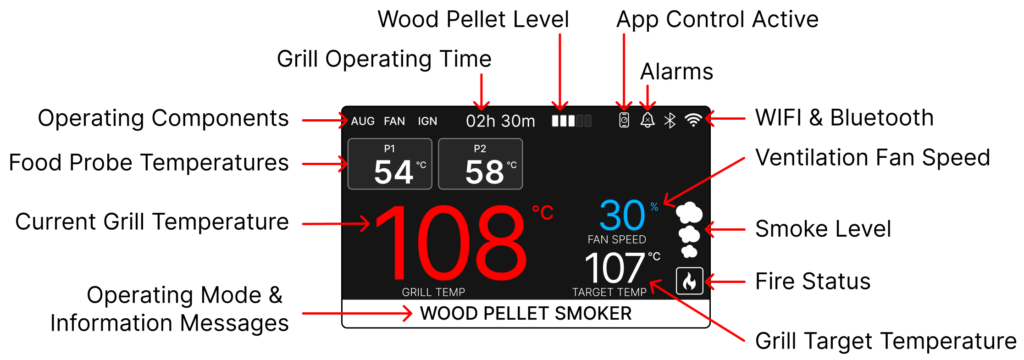
- Grill Operation Time: How long the grill has been running in the current cooking mode.
- Wood Pellet Level: Estimated remaining wood pellets in the hopper.
- App Control Active: The Trimal Aus app has recently (in last 2 minutes) been used to adjust the grill temperature or has active countdown or food probe actions.
- Alarms: One or more of the Fire-lit, Ready to Cook or Error notification sounds are on.
- WiFi & Bluetooth: Connection status.
- Ventilation Fan Speed: Current speed of the fan that supplies airflow to the fire.
- Smoke Level: Low, Medium or High smoke level setting.
- Fire Status: Flashing while fire is lighting, solid once fire is lit.
- Grill Target Temperature: Current target cooking temperature, heat or flame level (Eg. LOW, TURBO FLAME).
- Operating Mode: Current cooking mode and status. Eg. Firing Up, Heating Up, Child Lock Active.
- Current Grill Temperature: The temperature measured by the grill temp sensor at the left side of the grill.
- Food Probe Temperatures: Two food probes (P1, P2) plugged into the front of the control panel.
- Operating Components: This shows if the AUG (pellet feed auger), FAN or IGN (pellet ignitor) are current operating.
Controller Menu
To enter the top level Menu, press and hold the control knob. Scroll through the items by rotating the control knob and press to select.
Cooking Modes
- Wood Pellet Smoker (cooking mode)
- Open Flame Grilling (cooking mode)
- Hot Plate Cooking (Pot, Skillet, Kettle, Billy etc)
- Pizza Oven (cooking mode)
- Charcoal Fan (cooking mode)
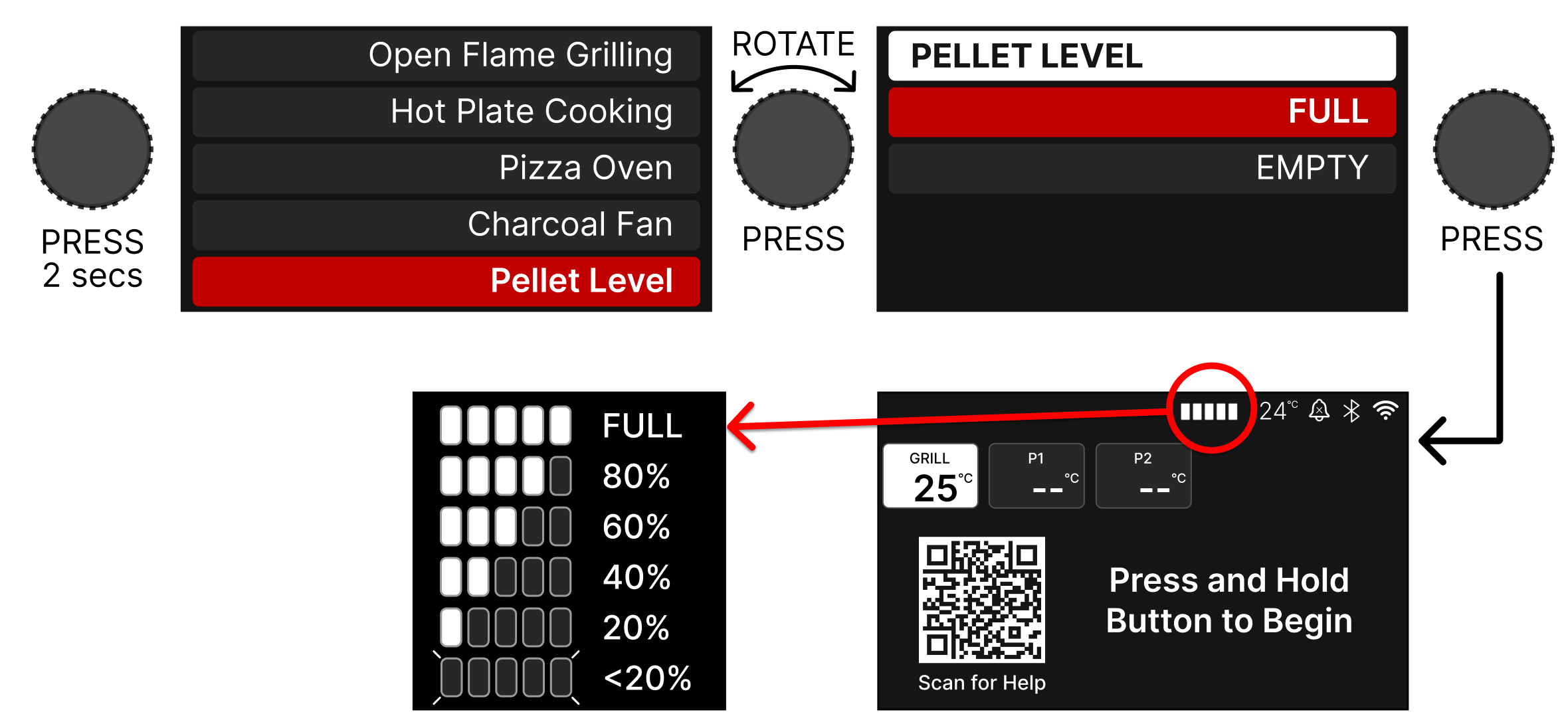
Pellet Level
- Set the wood pellet level in the hopper to FULL or EMPTY.
- If set to full, 5 bars will display on the controller and app, indicating 100% full.
- As the grill uses pellets the level will drop down.
- If below 20% a notification will be set to the device and Trimal Aus App.
Feed Pellets
- Manually operate the auger motor to push wood pellets from the hopper through the feed tube.
- This function is only available when the grill is in standby mode.
- Never feed extra pellets into the fire-pot before firing up as it can lead to an huge, unsafe fire.
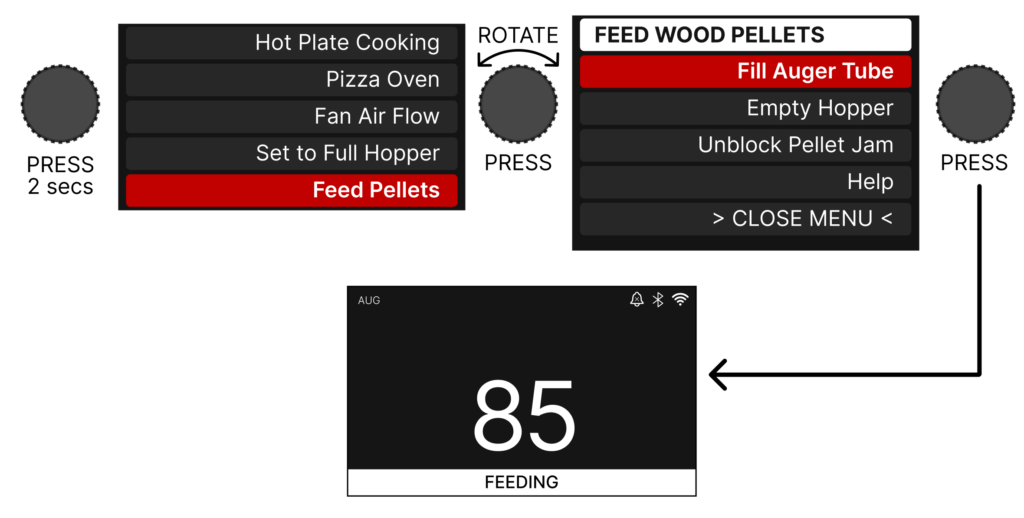
- Fill Auger Tube: use if the hopper and auger feed tube were empty. Will run the auger for 85 seconds to fill the up the auger tube and start to drop wood pellets into the fire-pot.
- Empty Hopper: use to empty the pellets from the bottom of the hopper out. Will run the auger for 3 minutes.
Settings
Click here to jump to section below with summary of all the grill settings.
Help
Select to view QR code that will bring you to this help site!
Turn Grill Off
Select to turn grill screen off. The grill will also turn the screen off automatically after several minutes of no user input.
Settings
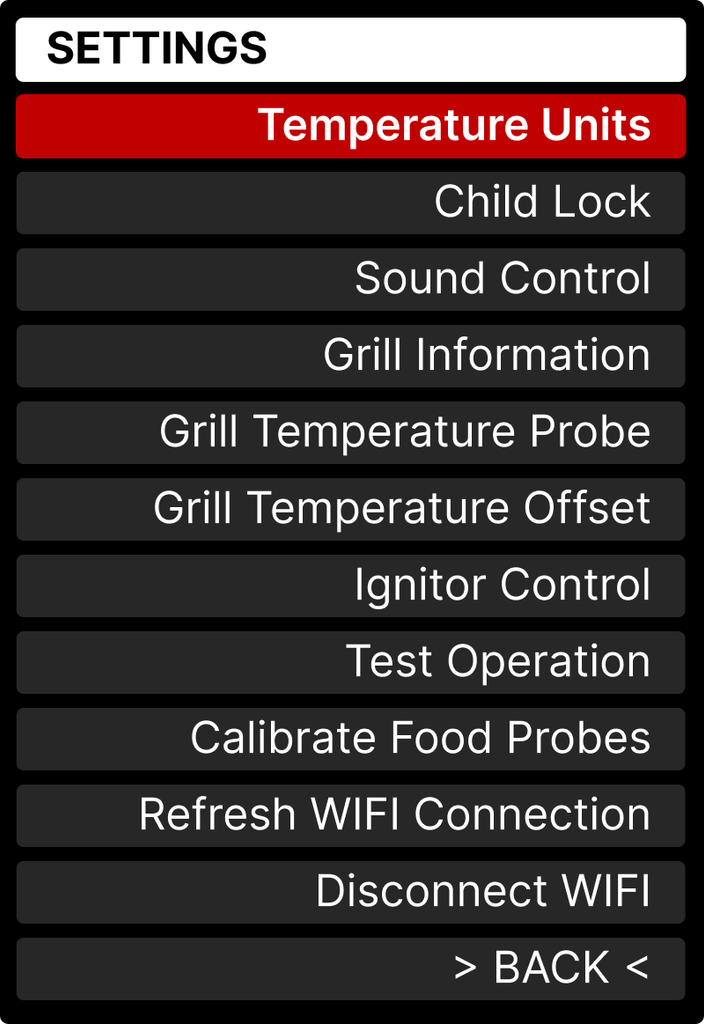
Temperature Units
- Select between Celsius and Fahrenheit for all grill temperature display and operation.
Child Lock
- Lock the grill through the settings or in the Trimal Aus app.
- Once locked, rotating or pressing (for short periods) the control knob will not take any action.
- Press and hold the control knob for >3 seconds to unlock (or unlock in the app).
Sound Control
- Set if the following sounds are made by the grill.
- Fire lit = 3 short beeps
- Grill ready too cook (up to temperature) = 3 short beeps
- Errors (such as flameout) = 3 long beeps
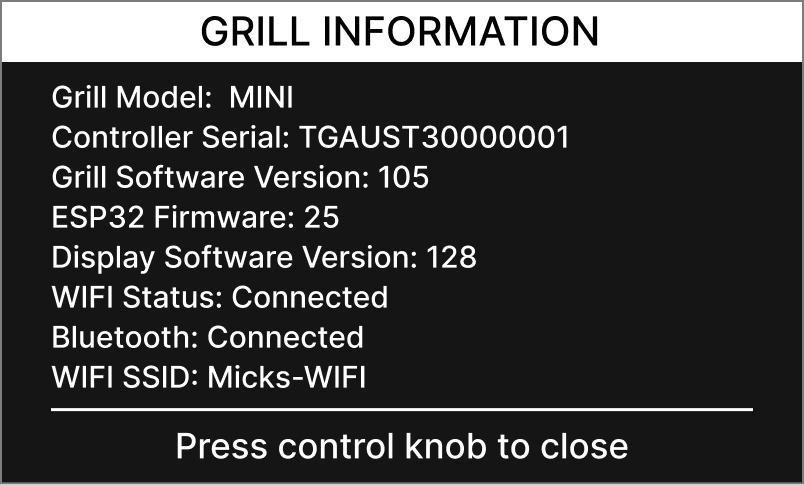
Grill Information
- Display the grill model, serial number, software versions and network connection information.
Grill Temperature Probe
- Select the grill temperature probe (default), Probe 1 or Probe 2 for grill temperature display and control.
- This can be useful if the grill temperature probe is faulty, or simply want to use another position in the grill for control.
Grill Temperature Offset
- Adjust if the grill temperature is consistently higher or lower than the middle of the grill rack.
Ignitor Control
- In the case that the pellet ignitor fails, use this function to turn it off until a new one can be changed over.
- In the meantime the grill can be manually fired up by putting a small pile of pellets in the fire-pot and lighting with a butane torch or fire-lighter while using the Charcoal Fan cooking mode to provide air flow (50-60% fan speed). Do not any flammable liquid.
- Keep the fire baffle and drip tray out, so the fire-pot can be observed.
- Once the fire is established, turn the power switch off and then immediately back on.
- Next fire up the grill as normal.
- Pellets will dump into the fire-pot and the fan speed will drop. Monitor to ensure the fire continues to burn.
- Once the fan speed increases from the low (20-30%) up to the higher 50-80% and the fire is roaring, put in the heat baffle, drip tray etc and close the lid so the grill can detect the temperature rise, confirming that the fire is lit.
Operating Time Limits
Notification to Phone
If the grill is left without any user input (knob press or App temperature change) a warning notification will be sent to the device that the Trimal Aus app is installed on.
Any user input will reset these counters. After the notification the grill will continue to operate.
- High Temperature Operation (<240℃ / 464℉) for more than 90 minutes
- Open Flame Grilling for more than 30 minutes
- Hot Plate Cooking for more than 90 minutes
Automatic Shut Down
For safety, if the grill operates without any user input it will eventually enter normal shutdown. Any user input will reset these counters.
- Wood Pellet Smoker for more than 12 hours
- Open Flame Grilling for more than 1 hour
- Hot Plate Cooking for more than 2 hours
- Pizza Oven for more than 2 hours
- Charcoal Fan for more than 8 hours